

When the EEPROM error: CRC 1STREGTON appears in the Antminer S19 Pro kernel log, you can troubleshoot by the following methods.
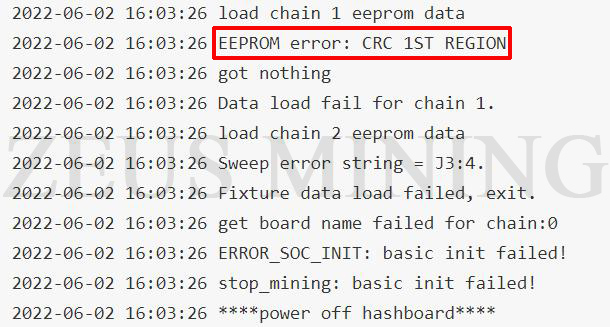
Troubleshooting:
It is recommended to use a hash board code editor to flash the EEPROM program.
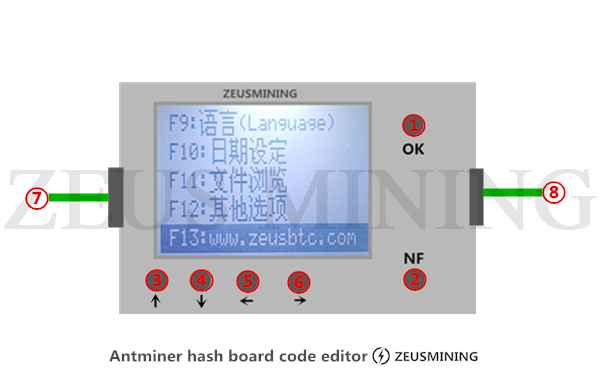
EEPROM program flashing steps:
1. Read EEPROM data
First, click the "NF" button on the hash board code editor to enter the menu interface, then insert the data cable into the hash board that needs to read data, and select (eerpom settings) on the editor and click the "OK" button, Then select (read eerpom) as needed, enter the hash board model to be marked, click OK to save the data. The editor page will automatically return to the initial interface.

Note: Power off the miner before operation.
2. Write EEPROM program
Click the button "FN" to enter the menu page, select (eerpom settings), click the (open eerpom) button, find the data file just saved, click the confirm button, and the device will return to the initial state here, click the editor "OK" button again to write the data to the hash board.

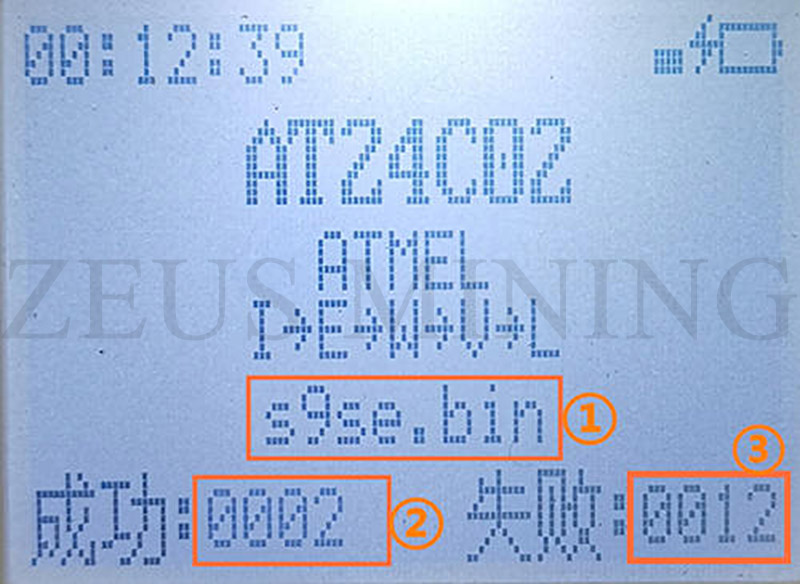
After clicking the "OK" button, if the device beeps once, it means that the EEPROM program is successfully written; if the device beeps twice, it means that the EEPROM program writing fails and needs to be rewritten.
Result schematic:
Click the article below to learn more.
>> How to use hash board code editor
>> Antminer S19 Pro Chain 0 only find 0 asic - S19 Pro Kernel Log
 China Mainland Hong Kong
  Business Hours: (GMT+8) 08:30-20:00 Mon to Sat
  Company Phone: +86-023-72227777
