

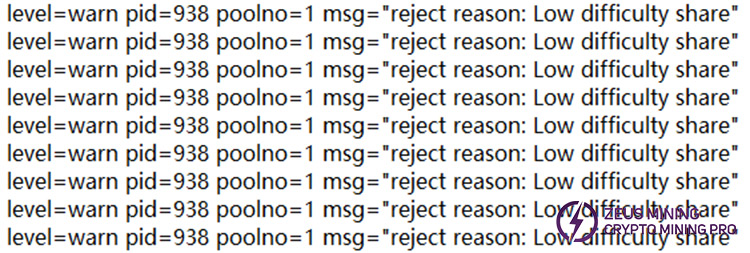
When the Antminer K7 miner has the following symptoms, it indicates that a fault problem has occurred: the log repeatedly reports "Low difficulty share," and the pool rejection rate continues to increase. How to fix the shared difficulty low fault situation?
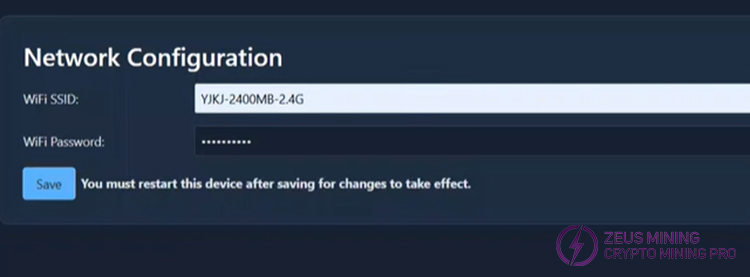
1. An unstable network or high latency will hinder the communication between the miner and the mining pool. As a result, the shares submitted by the miner cannot be confirmed by the mining pool in time, and are judged as low difficulty.
• Ensure the firewall settings are configured to permit the necessary connections for mining. Reconnect to a faster network.
2. When the network is congested, the information sent by the miner may be lost or delayed, which can affect the mining pool's accurate judgment of the share difficulty.
• Replace the network cable with a strong, anti-interference cable and connect it to the Gigabit LAN port on the router.
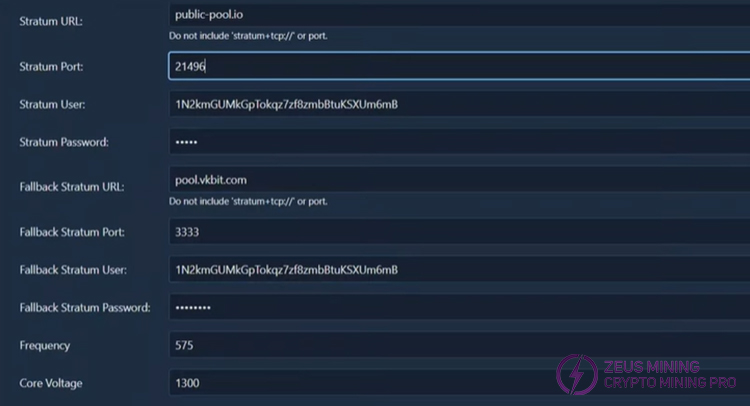
1. Check whether the mining pool and password are correct.
2. Whether the wallet address is incorrect.
3. Whether the frequency and voltage settings are matched.
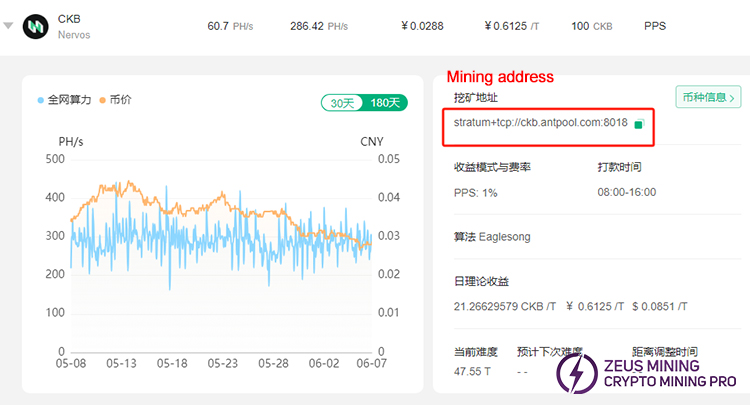
A low shared difficulty will make it challenging to find the correct block solution. It is recommended to switch to a different mining pool. We can find CKB currencies that support K7 mining on major mining pool websites, such as AntPool and f2Pool. Copy and fill in the mining pool address, then power on the miner and start mining.
ZEUS MINING provides troubleshooting articles for various ASIC miners, suitable for both novices and experienced users, including Antminer, LuckyMiner, Whatsminer, Innosilicon, Avalon, and more. We will continue to update the troubleshooting guide content. Please continue to pay attention.
If you encounter problems that cannot be solved, you can contact professional technicians for consultation, and we will patiently answer all your questions.
 China Mainland Hong Kong
  Business Hours: (GMT+8) 08:30-20:00 Mon to Sat
  Company Phone: +86-023-72227777
