

When the hash rate of the Antminer S21 miner drops rapidly during operation, the kernel log reports the number of ASIC chips missing. How to quickly repair the fault and restore the S21 miner's profit?
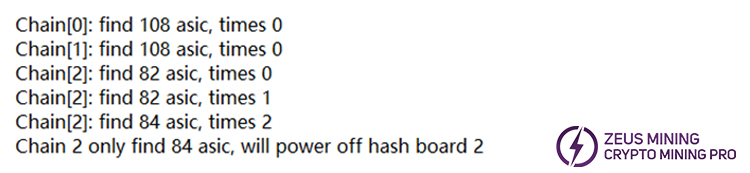
Entering the S21 web management background, the log indicates that three hash boards were successfully detected, chains 0 and 1 hash boards found the correct 108 ASIC chips. However, chain 2 reported "find 82 asic" for the first two times and "find 84 asic" for the third time. This means that the third hash board ultimately found only 84 chips, and the number of hash chips is therefore incomplete, so that the power will shut down the hash board.
Turn off the power of the miner and remove the faulty chain 2 hash board. It is recommended to use the PicoBT tester to troubleshoot the chain 2 hash board. For details, please click the PicoBT usage video.
(1) Use an 18-pin data cable to connect the test fixture to the hash board.
(2) Connect the 4-pin interface of the test fixture to the 12V power adapter and plug it into the power socket.
(3) Set the output voltage of the adjustable power supply to 15V and the current to 31A.
(4) The hash board needs to be powered on. Clap the positive and negative poles of the board with red and black alligator clips, then connect the other end into the power supply.
(5) Manually press the tester button to select Antminer S21. After selecting, press the white button to enter the test mode selection interface.
(6) Select and click "PIC mode" on the screen, set the number of tests, and press the white button again to start the test.
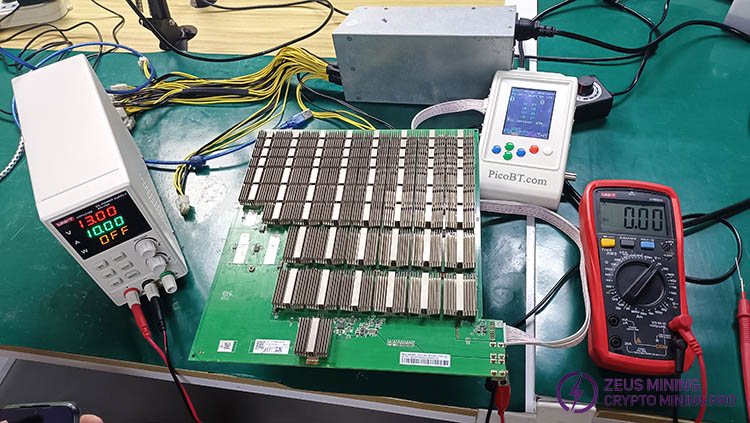
After the test fixture confirms the fault, first check whether the chip 84 has a poor solder joint. If so, re-soldering is required.
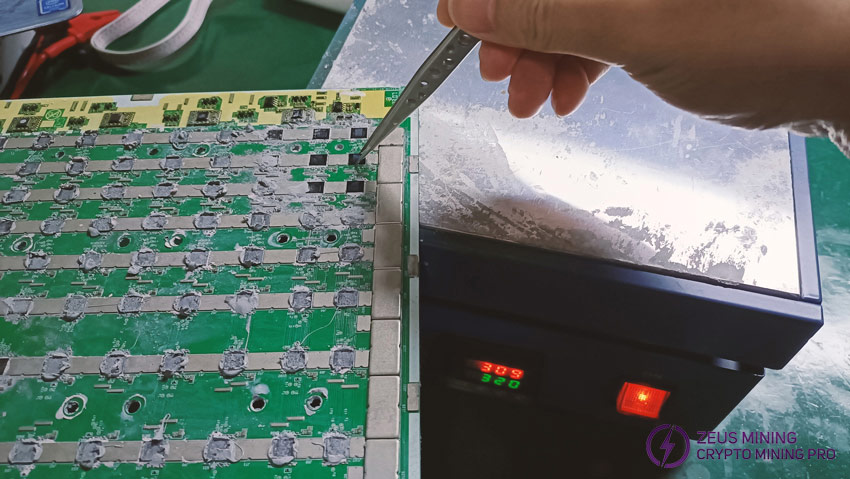
(1) Remove the hash board fixing screws and heat sink, then clean the chip surface of silicone grease and dust.
(2) Preheat the heating table to about 300°C, apply an appropriate amount of flux to the chip pins, and place the area that needs to be soldered on the heating table (do not place a large area or the entire hash board on it).
(3) Press the chip with tweezers until the solder on the chip pins is shiny, indicating that the re-soldering is successful. Finally, wait for the pad to cool down and clean the soldering point.
If after soldering, the test result still shows only 84 chips, it is recommended to short the TX (CO/CI) signal of the ASIC chip.
(1) First, short-circuit the TX (CO/CI) signal of chip No. 84. If the test fixture shows the same number as the short-circuit number, it means that there is no faulty chip between chips No. 1 and No. 84.
(2) Continue to short-circuit chip No. 85. If the test fixture still shows 84 chips, it means that chip No. 85 is abnormal.
(3) Further check whether the voltage of the TX (CO/CI) signal of chip No. 85 is 1.2V. If it does not meet the standard, check the resistance value of the resistor connected to the signal.
(4) If the resistor is damaged, replace it directly. If the resistor is standard, it is recommended to replace the ASIC chip No. 85. If the number is still incomplete after replacement, continue to short-circuit and check later.
ZEUS MINING provides more maintenance tips for the Antminer S21 hash board to help everyone get timely solutions when encountering other fault problems. Please stay tuned for ASIC miner troubleshooting knowledge; we will continue to update this information.
 China Mainland Hong Kong
  Business Hours: (GMT+8) 08:30-20:00 Mon to Sat
  Company Phone: +86-023-72227777
