

The miner PSU wake-up start tester is a specialized device for testing the output status of Antminer and Whatsminer PSUs. It can independently perform output voltage and load tests without connecting to a miner, enabling rapid diagnosis of PSU faults.
Please read this product manual before testing to further understand the device's operation information.
I. Supported power supply models
Antminer | APW121215 a / b / c / d / e / f / g |
APW121417 a / b | |
APW12, APW9, APW9+, APW8, etc. | |
Whatsminer | P222C, P221C, P21E, P21D, P21, P20 |
II. Device buttons and interface instructions
A: PSU input interface (DC 12V/6pin)
B: PSU model indicator light
C: PSU status indicator light
D1: Antminer PSU 4pin signal interface
D2: Whatsminer PSU 14pin signal interface
E1: Upward button to select the PSU model
E2: Downward button to select the PSU model
E3: Power supply start/stop button
E4: Device self-check button

III. Antminer Whatsminer PSU output test fixture operation guide
Step 1:
Connect a 12V power adapter to the "A" PSU input port to supply power to the tester.
Step 2:
After the PSU tester is powered on, press the "E2" button to select the power supply model downward. A lit light will indicate the selected model in the "B" area. Connect the PSU to be tested, then press the "E3" button to wake up the power supply and start measuring its output.
Step 3:
A green light in the "C" power supply status indicator indicates that the PSU is on; a red light indicates that it is off. The status indicator will turn green after pressing the "E3" button.
Step 4:
The power supply should output voltage once the PSU status indicator is green. If there is no output, check whether the selected power supply model and the PSU are compatible.
Step 5:
Output voltage after the PSU is woken up by the test fixture:
1) For Antminer APW12, APW9, and APW8 series: Output is the maximum voltage for each model.

2) The Whatsminer PSU is 12V. It should be noted that after testing the Whatsminer power supply, the PSU will wait for 10-30S to shut down after pressing the output tester button.
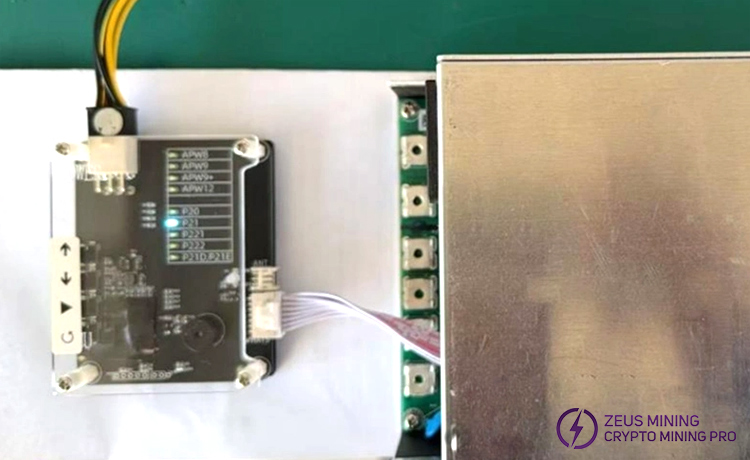
Please read this product manual before testing to further understand the device's operation information.
Warning: After the test rack awakens, the Antminer and Whatsminer PSU will output a large current. Do not short-circuit the power supply's positive and negative poles to avoid fire and damage.
IV. Precautions
1. Do not connect a short-circuited or damaged power supply;
2. Connect the power supply model correctly and ensure the interface is firm to avoid short-circuit risks.
3. The working voltage of this fixture is DC12V, and a 12V/1A power supply is recommended;
4. Please confirm the power status before testing to avoid electric shock and explosion, and prevent fire or personal injury.
5. Keep the working environment dry and avoid metal objects from contacting the interface.
6. Do not plug or unplug the connection cable with power on. Stop using it immediately if abnormalities are found.
7. The shutdown of Whatsminer is delayed. Please wait patiently to ensure the safe use of electricity.
Please use the test equipment following the regulations and understand the above safety precautions to avoid possible dangers and personal injury.
V. Fault symptoms and solutions
Common faults | Solution |
PSU cannot wake up | Reselect the power supply and make sure the model is correct. |
Check all interface connections for looseness. | |
PSU has no voltage output | The power supply may be faulty. Replace the power supply and test again. |
Indicator light abnormality | Perform a self-test on the tester first. If the fault is difficult to solve, contact maintenance. |
VI. Antminer Whatsminer PSU test stand advantages
• Efficient maintenance: The tester can independently detect PSUs without connecting to a miner, significantly reducing testing time and enabling accurate and efficient fault diagnosis.
• Smart and convenient: Button operations combined with intuitive LED indicators make the PSU test fixture easy to use, even for beginners.
• Safe and reliable: It is a secure power supply testing device that has been rigorously tested and proven in practical applications.
The Antminer Whatsminer wake-up start tester is an indispensable professional detection tool for miner maintenance personnel. Its innovative independent testing design revolutionizes traditional miner PSU detection methods and greatly improves mining farm maintenance efficiency.
>>How to replace APW12 1215a power supply?
Disclaimer:
This document is for reference only. Please strictly follow the specified usage steps and precautions. The website assumes no liability for equipment damage or other losses caused by improper operation and reserves the right to final interpretation.
 China Mainland Hong Kong
  Business Hours: (GMT+8) 08:30-20:00 Mon to Sat
  Company Phone: +86-023-72227777
