

The upgraded Antminer Universal Test Fixture adds the following functions to the original Antminer Universal Chip Fixture:
1. Insertion/Removal Control Function: When testing the hash board, pressing the PLUG CTL button on the fixture is equivalent to inserting and removing the data cable once, facilitating repeated testing. The hash board can be repeatedly tested without closing the fixture, improving maintenance efficiency.
2. Signal Power Supply Control Function: Voltage is controlled via a foot switch on the test fixture. Pressing the foot switch connects the power supply, and releasing it disconnects the power. Measuring signal voltage is very convenient.
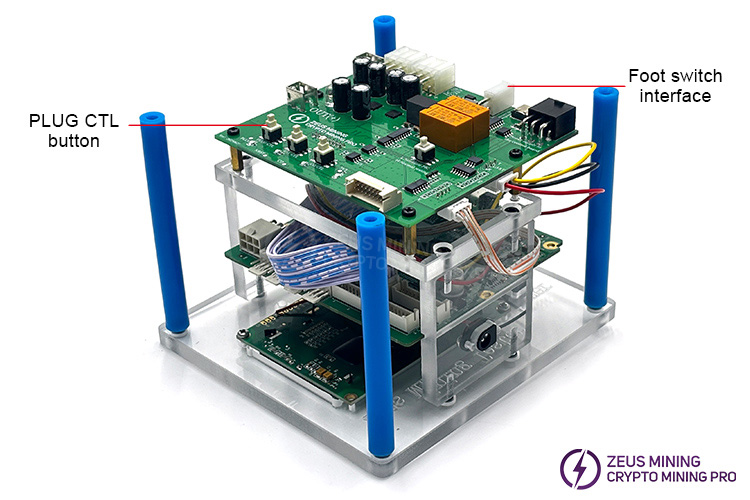
First, let's understand its overall structure.
I. If the hash board being tested is a 9-series, a 12V power cord must be connected to the plug port; the display screen is used to show test results; four ribbon cable ports are used to connect the test fixture to the hash board, and all ports are usable.
II. When testing the hash board, do not connect the fan to the fan port, as this may damage the fixture; if testing the hash board on an all-in-one machine, the miner's own power cord should be plugged into the 6-pin power port.
III. The USB port connects the tester to a computer for displaying test logs.
IV. To test the hash board of an all-in-one machine, the miner's 4-pin voltage regulator cable needs to be plugged into the 4-pin voltage regulator cable interface. The power adapter (PSU) must also be connected to this port to power the test device.
V. The card slot is used to insert a TF card containing test files. To test different hash board models, change the test files on this card.
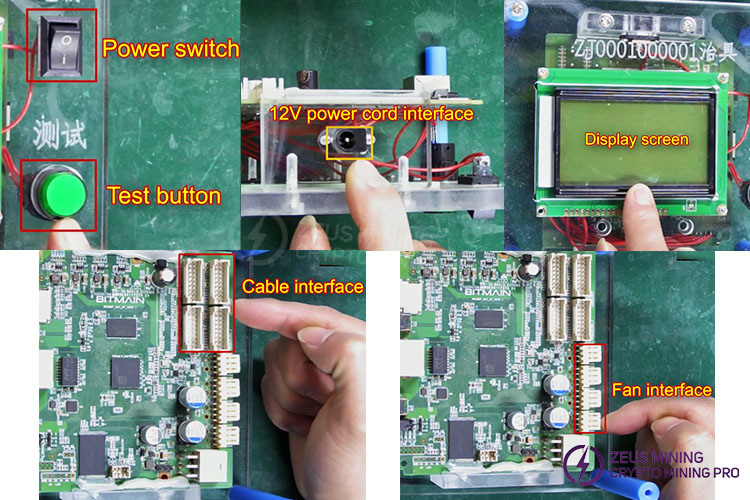
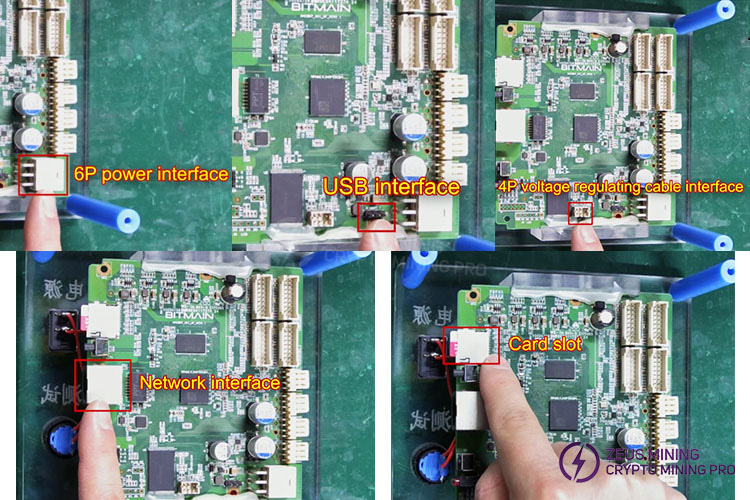
How to test the Antminer S19jpro hash board using the test fixture:
Step 1: Install the conversion file and test file, insert the TF card into the card reader, format the TF card on the computer, paste the S19K conversion file into the TF card, then insert the TF card into the card slot and power on the test device.
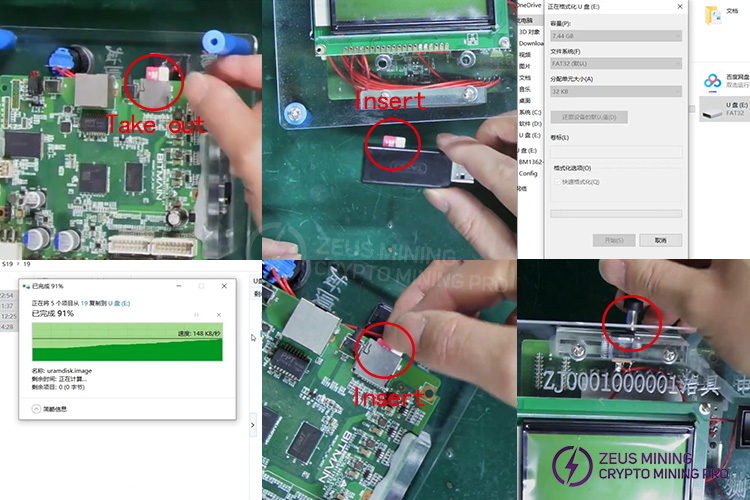
Note: During the file conversion process, the test device's screen will light up but will not display any content. If the indicator light flashes at least 5 times, the file installation is successful. If the test device is functioning correctly, all three indicator lights will be on; otherwise, there may be a problem.
Note: Do not touch the power supply section of the device while using it, as this may cause damage.
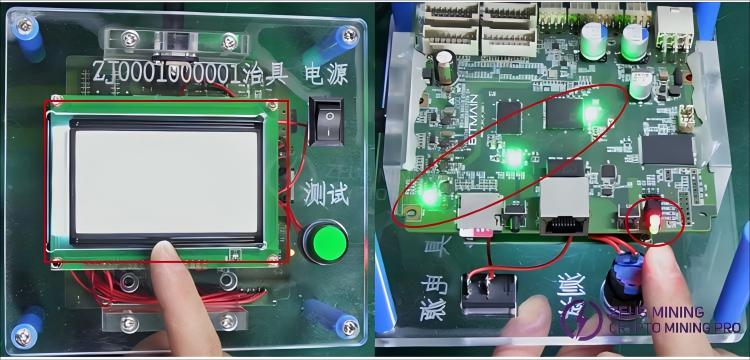
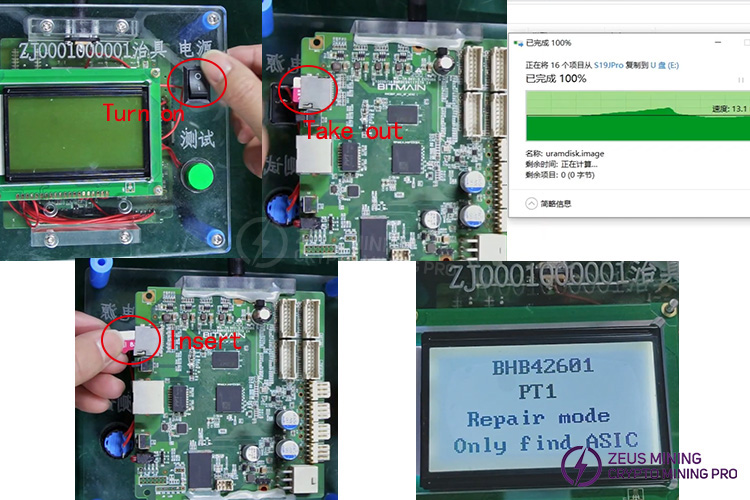
Next, turn off the power, remove and format the TF card, then copy and paste the S19jpro test file into the TF card, and reinsert the TF card into the card slot; turn on the power switch, and when the version number of the hashboard appears on the display, it means that the test file has been successfully installed.
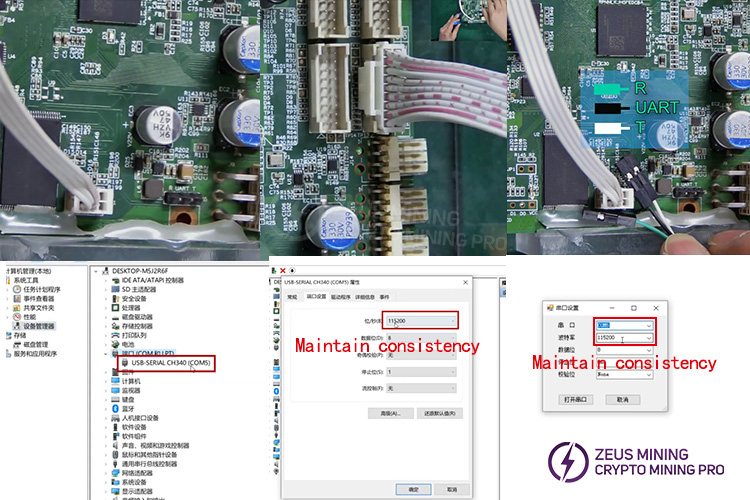
Step 2: Connect the fixture, hash board, and computer cables.
To test the S19jpro hash board, we need to use an APW12 power supply, which powers both the tester and the hash board. Insert the 4-pin regulator cable from the power supply into the corresponding port, and then connect the 6-pin power cable to power the fixture. Next, connect one end of the hash board cable to the test fixture. Connect the green wire of the USB cable to the "R" pin, the black wire to the "UART" pin, and the white wire to the "T" pin.
Then, plug the other end of the USB cable into the computer. On the computer, locate Device Manager, double-click the COM5 port, and confirm that the baud rate is set to this value in the port settings. Open a serial port software (I used HyperTerminal, but other testing software will also work). Click the "+" to open the serial port and confirm that the serial port parameters here match the computer's parameters.
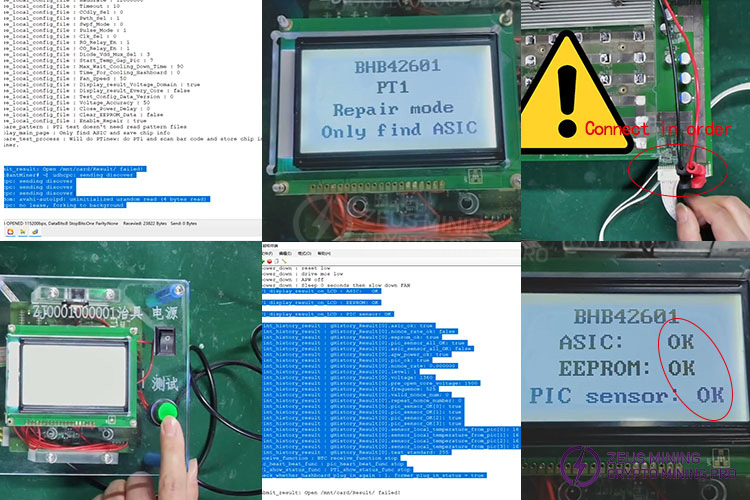
Step 3: Connect the hash board and begin testing. We need a cooling fan to cool the computing board. First, power on the test device to complete the self-test. When the serial port software displays this message, it indicates that the test device has completed the self-test, and the hash board version will also be displayed on the test device screen.
Next, continue connecting the hash board ribbon cable and power cable. The order here is crucial. Connect the negative power cable first, then the positive power cable, and finally the computing board power cable. Incorrect connections may cause components on the computing board to burn out. After the test, disconnect these cables in reverse order: the ribbon cable, the positive power cable, and the negative power cable. Finally, press the test button to start testing the hash board. When the serial port displays these results, it indicates that the test is complete.
It is compatible with most Bitmain models, including Antminer S21XP, S21+ Hydro, L9, S21Pro, S21 Hydro, T21, KS5PRO, KS5, KS3, S19Pro Hydro, S19Pro+ Hydro, S21, KA3, HS3, K7, D7, L7, S19kpro, S19XP, S19XP Hydro, S19Pro, T19 Hydro, S19 Hydro, S19jpro, S19j, S19+, S19jpro+, T19, S19, S19i, S17+, S17e, S17, S17pro, T17+, T17e, T17, S15, T15, Z15, S11, S9se, S9k, S9j, S9i, T9+, T9, Z9, Z9mini, S9, and ETC.
For more product and service information, please click to join our official Telegram channel
Dear Customers,
Hello, September 25, 26, and 27, 2026 (GMT+8) are the traditional Chinese festivals - the Mid-Autumn Festival. Our company will suspend shipments during these 3 days and resume shipments on September 28 (GMT+8). We are deeply sorry for the inconvenience. Thank you for your understanding and support.
Best wishes,
ZEUS MINING CO., LTD.
 China Mainland Hong Kong
  Business Hours: (GMT+8) 08:30-20:00 Mon to Sat
  Company Phone: +86-023-72227777
