

The EEPROM data line of the hashboard decoding tool has a built-in small circuit board, protocol decoding chip and wire harness definition function, which can rewrite the standard program into the chip to realize the software data synchronization of all hashboards in the miner. This tool effectively resolves mining rig malfunctions caused by mixing different program versions of hash boards or inconsistent program files after single-board testing and maintenance, quickly restoring the hash boards to a stable working state.
This article will detail how to use the EEPROM programming cable to read, write, and save the EEPROM program on Whatsminer hash boards, quickly restoring the stable operation of the miner.
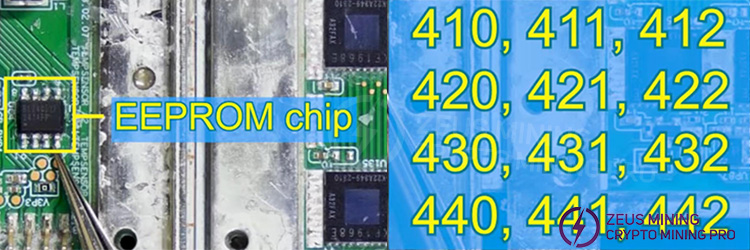
1. Locate the EEPROM chip on the Whatsminer hash board. Errors in the chip's internal program can cause the mining machine to malfunction. If the miner displays the following error codes, you will need to reprogram the EEPROM chip using a hash board programming cable.
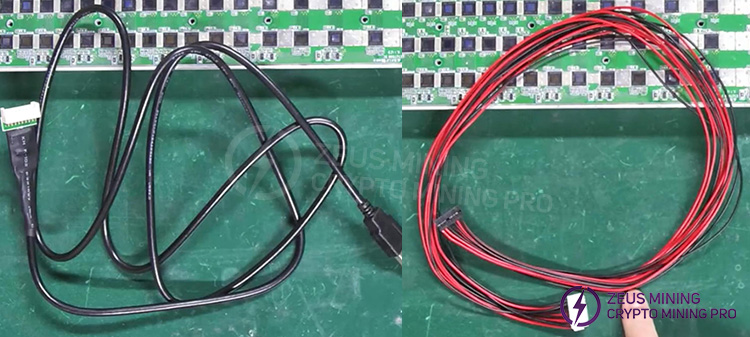
2. The EEPROM programming cable can be used with most Whatsminer and Antminer hash boards. The black cable is the EEPROM programming cable, and the red and black cable is the hash board ribbon cable.
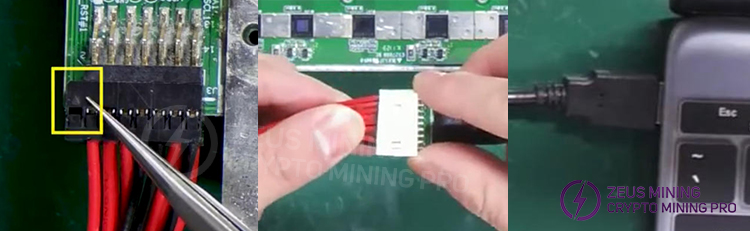
(1) Insert the ribbon cable into the IO interface of the hash board. Note: The triangle in the yellow box should be facing upwards.
(2) Connect the other end of the ribbon cable to the EEPROM programming cable.
(3) Connect the USB end of the EEPROM programming cable to your computer.
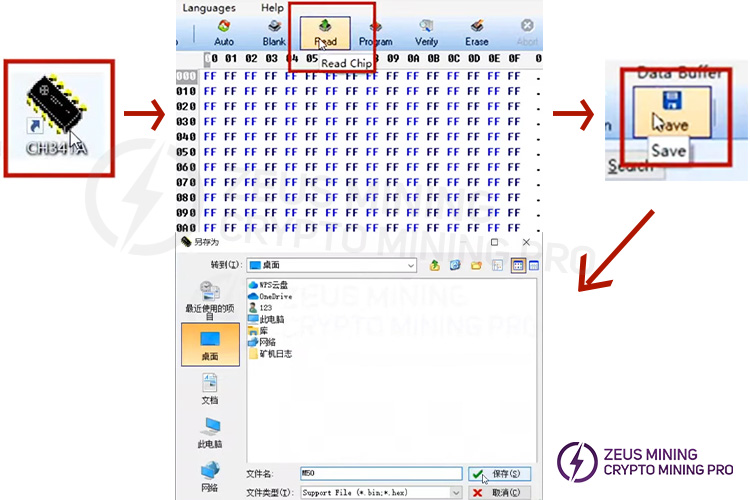
3. Open the programming software and click "Read" to read the file from the EEPROM chip. Then click "Save," enter a filename, and save the read file.
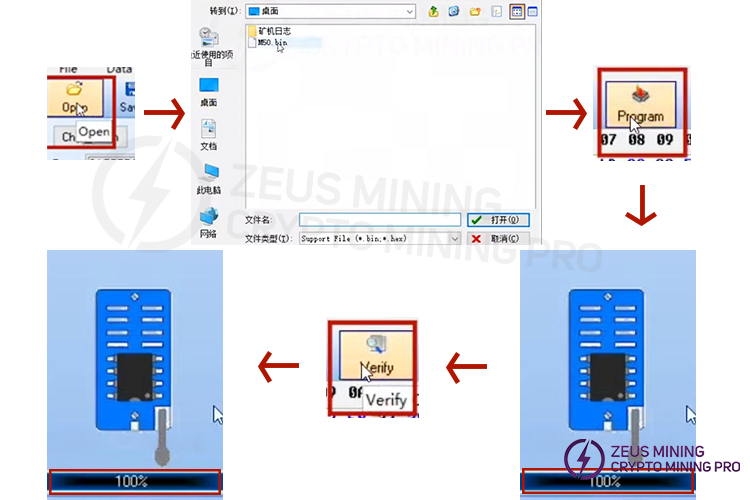
4. When you need to write a file to a new EEPROM chip, click "Open," double-click to select the file you want to write, and then click "Program." When the progress bar in the lower left corner reaches 100%, the file has been successfully written. Finally, click "Verify," and when the progress bar in the lower left corner also shows 100%, the verification is successful.
By following the steps above, you can easily read, back up, and flash the EEPROM program of your Whatsminer hash board. During the process, please pay close attention to the cable direction and connector alignment. Regularly maintaining the EEPROM program can significantly reduce troubleshooting and repair time in case of miner malfunctions, thus improving equipment operating efficiency.
How to flash Whatsminer EEPROM program using hash board programming cable
For more product and service information, please click to join our official Telegram channel
 China Mainland Hong Kong
  Business Hours: (GMT+8) 08:30-20:00 Mon to Sat
  Company Phone: +86-023-72227777
