

Cryptocurrency mining is a long-term investment, and the lifespan of miners directly impacts final profitability. Regular and standardized maintenance not only extends hardware uptime but also effectively reduces failure rates and improves overall output efficiency. This article uses the Bitmain Antminer S23 as a reference model to systematically introduce daily maintenance methods for miners, illustrating key operational points with diagrams to help miners achieve more stable operation and management.
1. Familiarize Yourself with the Core Structure and Operating Characteristics of Miners
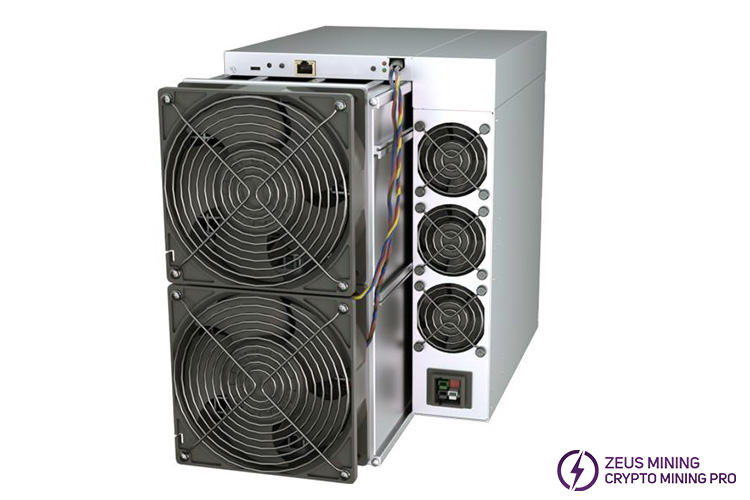
Taking the Bitmain Antminer S21 Pro Bitcoin Miner as an Example
The S21 Pro is currently a mainstream model widely used in Bitcoin mining. It adopts an ASIC chip architecture and supports high-load operation around the clock. Its key parameters are as follows:
Hashrate: Approximately 234 TH/s, applicable to SHA-256 algorithm
Power consumption: Approximately 3531W (under ambient temperature of 25°C)
Power efficiency on wall @25°C: Approximately 15 J/TH
Communication interface: RJ45 Ethernet 10/100M
Operating temperature: Between 0°C and 40°C
Cooling system: Built-in four high-speed fans, using an air-cooled design
This model has high requirements for the operating environment, especially in terms of heat dissipation, power supply, and dust prevention. Similar maintenance strategies also apply to other popular models, as well as some liquid-cooled versions.
2. Daily inspection items
(1) Appearance and ventilation inspection
Observe the miner's air inlet and outlet daily for dust accumulation or foreign objects obstructing them. Any factor that obstructs airflow will cause the internal temperature to rise, affecting chip stability.
At the same time, pay attention to the fan operation status. If abnormal noise or abnormal speed occurs, it may be a sign of bearing wear or fan failure.
Check whether the network cable interface is loose, ensure that the miner is stably connected to the network, and that the control panel displays normally. It is recommended to inspect each miner once a day, taking approximately 5-10 minutes.
(2) Ambient Temperature and Humidity Monitoring
The optimal operating temperature range for miners is 20°C to 30°C. Exceeding this range, especially consistently above 40°C, will accelerate the aging of electronic components and may even lead to a decrease in hash rate or chip damage.
It is recommended to deploy multiple temperature and humidity sensors to monitor temperature changes in the miner's air intake area in real time to avoid localized overheating.
(3) Operational Status Monitoring
Track the real-time computing power of each miner through the pool backend or miner management software. If the hash rate of a miner drops significantly, it may be due to overheating triggering frequency reduction protection, or firmware abnormalities, chip failures, etc., requiring timely investigation.
3. Weekly Maintenance Focus
(1) Dust Removal and Cleaning Operation
Use an industrial compressed air gun to blow air from the fan side towards the heat sink and circuit board to remove accumulated dust. Ensure the air jet direction is consistent with the fan exhaust direction to prevent dust from entering the motor bearings.
At the same time, clean the shelves and floor in the area where the miner is located to reduce dust re-adhesion. Before operation, it is recommended to wear an anti-static wrist strap to avoid static electricity damaging sensitive components.
(2) Power System Inspection
Check that the power cord plug is firmly inserted and that the cable is free from damage, overheating, or oxidation. If the power interface is found to be discolored or loose, it should be replaced immediately to prevent poor contact from causing voltage fluctuations and damaging the power supply or hash board.
Confirm that the power distribution unit (PDU) load is balanced to avoid excessive current in a single circuit.
(3) Firmware and Mining Pool Configuration Updates
Regularly monitor the firmware versions released by the miner manufacturer and upgrade as needed to improve operational stability or fix known issues.
Also, verify that the pool address, port, and working miner name are correct to avoid frequent disconnections or submission failures due to configuration errors.
4. Monthly and Quarterly Deep Maintenance
(1) Airflow Optimization
Check the spacing between miners on the rack to avoid excessively dense front and back rows causing heat backflow. For large-scale mining farms, consider setting up hot and cold aisle isolation to improve overall heat dissipation efficiency.
(2) Environmental Equipment Maintenance
If the mine is equipped with cooling equipment such as air conditioners, industrial fans, or wet curtains, the filters should be cleaned regularly, and the cooling effect should be checked. With seasonal changes, especially in the summer when humidity rises, it is necessary to strengthen the management of equipment for moisture and corrosion prevention.
5. Record Management and Trend Analysis
It is recommended to establish a simple equipment operation log, recording the following: (Taking Antminer S21 Pro as an example)
Date | Model | Average temperature | Hash rate | Maintenance Records |
2026.3.2 | Antminer S21 Pro | 23℃ | 220 TH/s | Cleaning the fan |
2026.3.9 | Antminer S21 Pro | 24℃ | 223 TH/s | Routine inspection |
By continuously recording data, rising temperature trends can be detected early, allowing for prediction of whether the cooling system needs strengthening or whether the fan is nearing the end of its lifespan.
6. Common Troubleshooting Recommendations
(1) Frequent High-Temperature Alarms from the Miner
Check if the fan speed is normal, clean the dust from the air inlet, and improve room ventilation. If the heatsink is heavily dusty, consider disassembling and deep cleaning.
(2) Unstable Network Connection
Try changing the network cable or switch port, and check for IP address conflicts. Observe the connection status after restarting the miner, and reset the network configuration if necessary.
(3) Abnormal Power Output
It is recommended to configure a voltage regulator or uninterruptible power supply (UPS) to avoid voltage fluctuations impacting the equipment. Avoid connecting high-power devices, such as welding machines and compressors, on the same line.
7. Long-Term Benefits of Maintenance
Miner maintenance is not an optional extra, but a crucial aspect of ensuring return on assets. High-performance devices, such as the Antminer S21 Pro, while excelling in hash rate and energy efficiency, rely heavily on good environmental control and periodic maintenance for stable operation. Only by continuously investing in aspects such as temperature, airflow, cleanliness, power supply quality, and software configuration can we minimize failure rates, extend equipment lifespan, and achieve more stable mining output. Adhering to daily, weekly, and monthly maintenance checklists is an effective way to improve mining farm operational efficiency and ensure stable revenue.
Disclaimer:
For cryptocurrency tutorial purposes only, not investment advice. This website is not responsible for the actions taken by readers based on the information in this article.
For more products and information, please click to join our official Telegram channel.
 China Mainland Hong Kong
  Business Hours: (GMT+8) 08:30-20:00 Mon to Sat
  Company Phone: +86-023-72227777
