

When the Antminer KS5 miner experiences a drop in total hash rate, unstable operation, and frequent restarts, we need to quickly find the cause of the anomaly to resolve the issue and restore the miner's profitability.
1. Access the kernel log of the Antminer KS5 miner through the web interface and find the key information. Chain 3 reports "asic num error" "detected asic num less than design (68<92)".
2. It shows that the correct number of ASIC chips for hash board No. 4 should be 92, but only 68 were found. The missing number of ASIC chips causes the miner to be in a running fault state.

• Connect the 4pin voltage regulator cable to the tester and insert the 6pin power supply cable. One end of the hash board cable is connected to the fixture.
• Use a USB-to-TTL cable to connect the fixture to the computer. After powering on, let the tester complete the self-test.
• Use red and black alligator clips to connect the positive and negative poles of the hash board and the power supply, and insert the other end of ribbon cable into the hash board. Press the test button to start the test.
• First use tweezers to short the CO (CI/TX) signal of chip No. 68. If the test fixture shows that there are 68 chips, it means that there are no problems with chips No. 1 to 68.
• Then short the CO (CI/TX) signal of chip No. 69 in turn. If the test fixture still shows that there are 68 chips, it means that chip No. 69 is abnormal and needs further investigation.
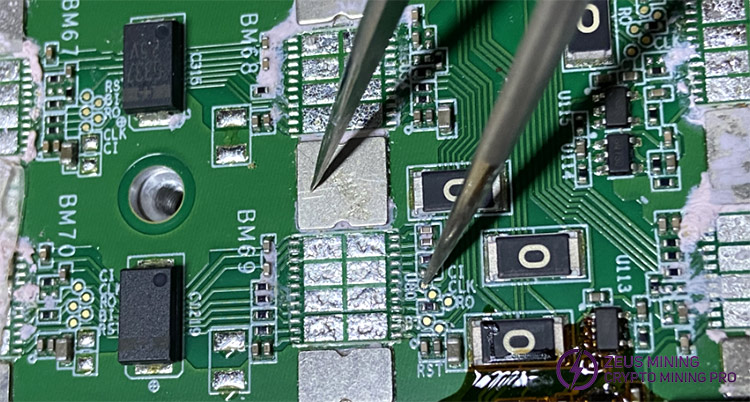
If so, check whether the voltage of the resistors connected to these three signals is within the normal range. If the voltage is abnormal, replace the resistor. If the resistor voltage is normal, replace the faulty ASIC chip.
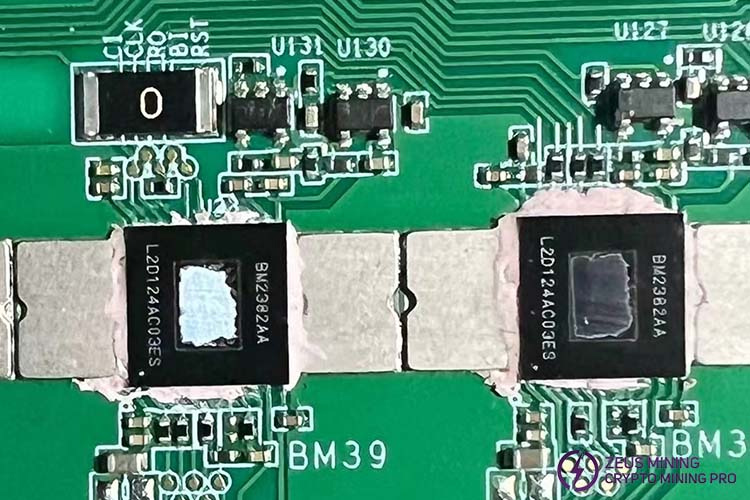
• After replacing the faulty chip, use the test fixture to check the No. 4 hash board. If the repair is complete, put it into the miner and start it.
• If the test fixture result still shows an incomplete fault, we continue to use the same troubleshooting method and check the direction of the No. 92 ASIC chip.
1. Take preventive maintenance: regularly clean the hash board heat sink and check the power supply stability. It is recommended to conduct a comprehensive inspection every six months.
2. Repair decision reference: If the number of hash chips on a single board is severely damaged, it is recommended to replace the entire board.
ZEUS MINING provides more Antminer KS5 hashboard repair tips to help novices and users get timely solutions when encountering various fault problems.
 China Mainland Hong Kong
  Business Hours: (GMT+8) 08:30-20:00 Mon to Sat
  Company Phone: +86-023-72227777
