

The IceRiver Monitor Tool is a very convenient tool for monitoring miners, it supports ASIC miners such as KS0, KS0Pro, KS0 Ultra, KS1, KS2, KS3, KS3L/M, KS5L, etc.
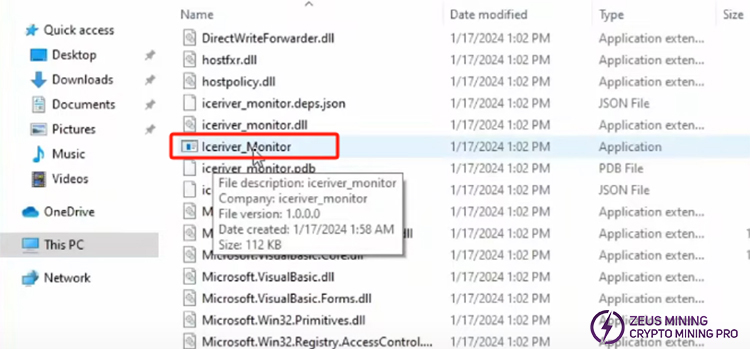
1. Download the IceRiver monitor tool, unzip the folder, double-click the Iceriver_Monitor monitoring program to enter and run it immediately.
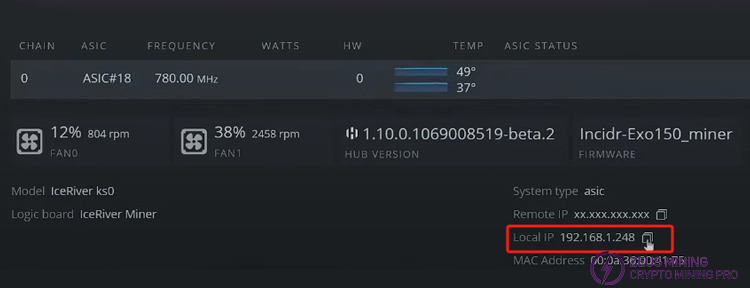
3. We need to fill in the IP address. Obtain the local IP address, copy it, and paste it into the monitor software that we have started run.
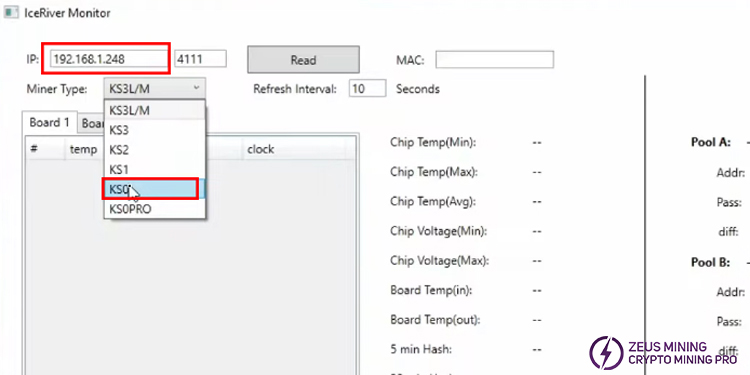
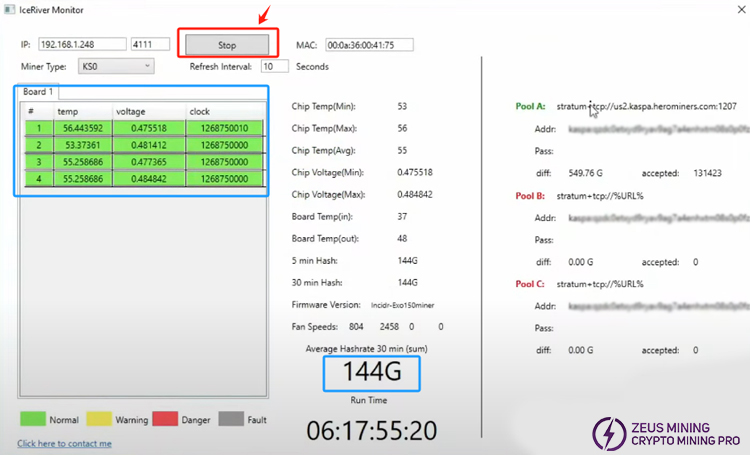
4. After clicking "Read" becomes "Stop", we can see that the page displays the data of KS0, including temperature, voltage, clock rate, circuit input and output, hashing rate, and the page on the right displays the mining pool information.
Please contact Jay WhatsApp, who is the senior technical engineer at ZEUS MINING, to obtain and download the IceRiver monitor tool software.
The IceRiver Monitor Tool can accurately display important statistical data of IceRiver miners, including data such as the temperature, voltage, and frequency of each chip on each hash board. And it can help us check miner information accurately in real time. Each indicator in the monitoring can provide valuable information to users, allowing them to detect abnormal phenomena in a timely manner and resolve miner crises.
 China Mainland Hong Kong
  Business Hours: (GMT+8) 08:30-20:00 Mon to Sat
  Company Phone: +86-023-72227777
