

Antminer has a built-in self-diagnostic system. When hardware or software anomalies are detected, error codes are displayed via kernel logs. Correctly identifying these codes is critical for quickly restoring the hash rate. This document is based on Bitmain's official documentation and actual repair experience, providing a complete list of all defined Antminer error codes.
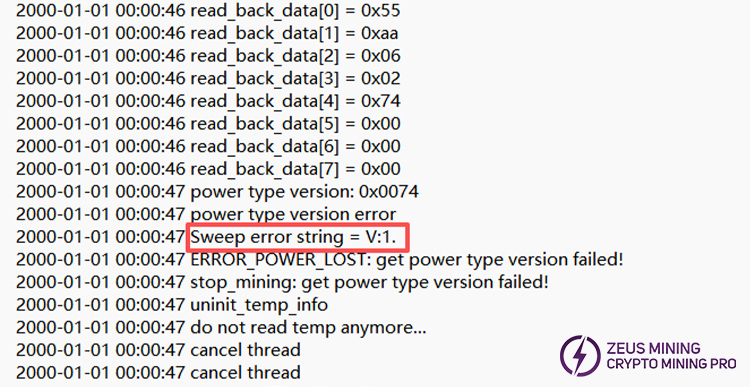
1. Average Total Hash Rate Anomaly
Error Code | Cause | Suggestions |
R:1 | The average total hash rate is too low | 1. Upgrade firmware to the latest version |
2. Hashboard Is Broken or has a low hash rate
Error Code | Cause | Suggestions |
R1:1 | Chain1 hashboard damaged or hash rate too low | 1. Check Chain1 connection |
R2:1 | Chain2 hashboard damaged or hash rate too low | Same as above |
R4:1 | Chain3 hashboard damaged or hash rate too low | Same as above |
R8:1 | Chain4 hashboard damaged or hash rate too low | Same as above |
3. ASIC Chip Damage
Error Code | Cause | Suggestions |
J1:1 | Chain1 has damaged ASIC chip | 1. Upgrade firmware 2. Replace the power supply |
J2:1 | Chain2 has damaged ASIC chip | Same as above |
J4:1 | Chain3 has damaged ASIC chip | Same as above |
J8:1 | Chain4 has damaged ASIC chip | Same as above |
4. PIC Control Chip Error
Error Code | Cause | Suggestions |
J1:5 | Chain1 PIC chip anomaly | 1. Check Chain1 connection |
J2:5 | Chain2 PIC chip anomaly | 1. Check Chain2 connection |
J4:5 | Chain3 PIC chip anomaly | 1. Check Chain3 connection |
J8:5 | Chain4 PIC chip anomaly | 1. Check Chain4 connection |
5. ASIC Chip Count Anomaly (Fewer Than Designed)
Error Code | Cause | Suggestions |
J1:2 | Chain1 detected fewer chips than designed | 1. Check Chain1 connection |
J2:2 | Chain2 insufficient chip count | 1. Check Chain2 connection |
J4:2 | Chain3 insufficient chip count | 1. Check Chain3 connection |
J8:2 | Chain4 insufficient chip count | 1. Check Chain4 connection |
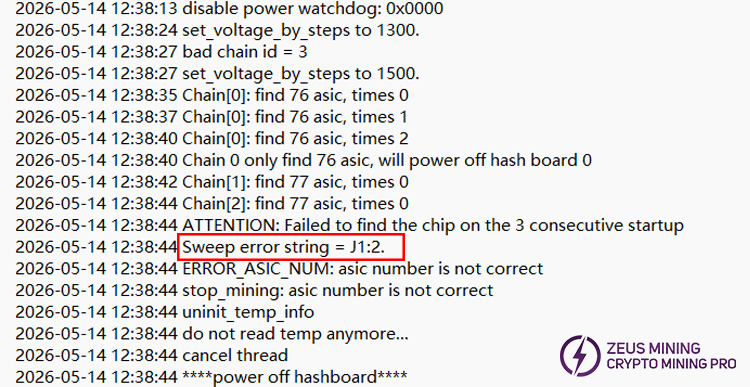
6. Voltage or Frequency Out of Limits
Error Code | Cause | Suggestions |
L1:1 | Chain1 voltage or frequency out of limits | 1. Upgrade firmware to the latest version |
L2:1 | Chain2 voltage or frequency out of limits | Same as above |
L4:1 | Chain3 voltage or frequency out of limits | Same as above |
L8:1 | Chain4 voltage or frequency out of limits | Same as above |
7. Voltage or Frequency Mismatch
Error Code | Cause | Suggestions |
L1:2 | Chain1 voltage or frequency mismatch | 1. Upgrade firmware to the latest version 2. Return to the factory for repair |
L2:2 | Chain2 voltage or frequency out of limits | Same as above |
L4:2 | Chain3 voltage or frequency out of limits | Same as above |
L8:2 | Chain4 voltage or frequency out of limits | Same as above |
8. Cooling Fan Not Detected or Low Speed
Error Code | Cause | Suggestions |
F1:1 | Fan1 not detected or low speed | 1. Check Fan1 connection 2. Replace the power supply |
F2:1 | Fan2 not detected or low speed | 1. Check Fan2 connection 2. Replace the power supply |
F4:1 | Fan3 not detected or low speed | 1. Check Fan3 connection 2. Replace the power supply |
F8:1 | Fan4 not detected or low speed | 1. Check Fan4 connection 2. Replace the power supply |
9. EEPROM File Error
Error Code | Cause | Recommendations |
J1:4 | Chain1 EEPROM file error | 1. Re-run the factory test for Chain1 |
J2:4 | Chain2 EEPROM file error | 1. Re-run the factory test for Chain2 |
J4:4 | Chain3 EEPROM file error | 1. Re-run the factory test for Chain3 |
J8:4 | Chain4 EEPROM file error | 1. Re-run the factory test for Chain4 |
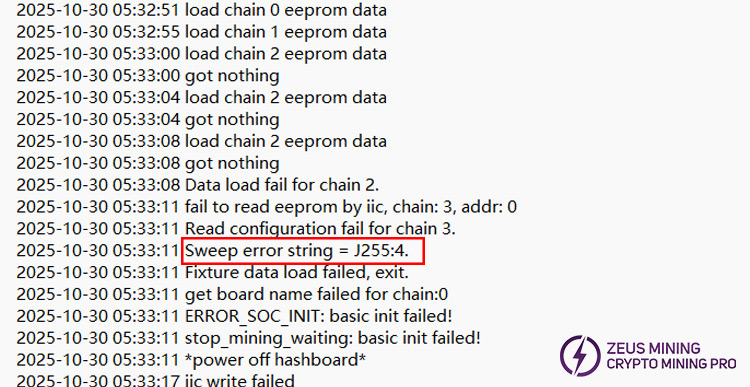
10. Other Error Codes
Error Code | Cause | Recommendations |
N:1 | Average hash rate far exceeds sales hash rate | 1. Upgrade firmware to the latest version |
N:2 | Frequency reduced too much | 1. Upgrade firmware to the latest version |
V:1 | Power supply initialization error or wrong output voltage | 1. Check power supply output lines 2. Update firmware to the latest version |
V:2 | Power supply uncalibrated | 1. Update firmware to the latest version 2. Replace the power supply |
F:1 | Fan error | 1. Check fan connection |
J:8 | Fewer hashboards than designed | 1. Check the hash board connections |
P:1 | High temperature protection | 1. Check if the ambient temperature is normal |
P:2 | Low temperature protection | 1. Check if ambient temperature is normal |
J:6 | Temperature sensor failure | 1. Check the hash board connection 2. Update firmware to the latest version |
M:1 | Memory allocation error | 1. Update firmware to the latest version 2. Replace the control board |
L:2 | Mix level not found | 1. Upgrade firmware to the latest version |
N:4 | Network connection lost | 1. Check network connection |
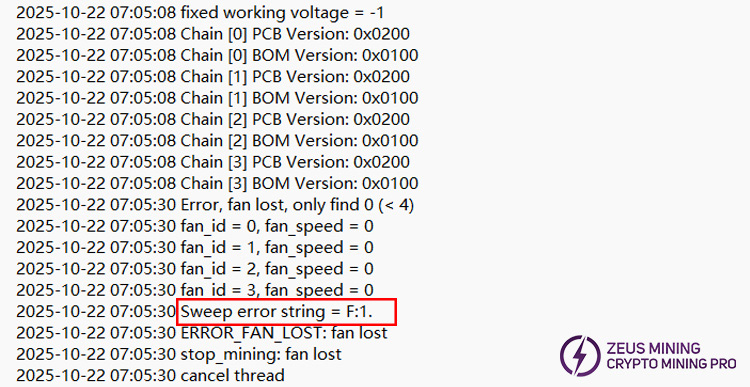
Correctly interpreting Antminer error codes is a key skill for efficient mining farm operation. Miners are advised to regularly back up logs and use this guide to quickly locate faulty chains, reducing downtime. For miners who repeatedly show the same code, arrange timely repair or replacement to avoid affecting the machine's overall lifespan.
Zeus Mining has compiled and shared a series of in-depth troubleshooting articles on Antminer hashboard repair and launched online training video courses covering advanced topics such as ASIC chip-level repair, PIC reflashing, and voltage fault troubleshooting.
👉 Visit Zeus Mining's official channels for more repair resources and technical tutorials.
Disclaimer: This document is based on publicly available information and is for reference only. Always follow equipment safety regulations during actual repairs. Non-professionals should not disassemble the control board or power supply.
About authorJay Zha | ZEUS MINING Senior Hardware Engineer
Specializing in ASIC miner fault diagnosis and repair, with many years of experience repairing the entire Antminer series (S19, S21, L7, L9, etc.). Proficient in quickly locating faults in core modules such as fans, power supplies, temperature controllers, and ASIC chips through kernel logs, and dedicated to providing mining farm operators and maintenance technicians with systematic and operational troubleshooting guides.
🏷 Area of expertise: ASIC miner repair
 China Mainland Hong Kong
  Business Hours: (GMT+8) 08:30-20:00 Mon to Sat
  Company Phone: +86-023-72227777
