

AvalonMinerViewer is a monitoring and management tool designed specifically for Canaan Avalon series miners. It retrieves data via the miner's API and presents the operating status in an intuitive graphical interface.
For miner operations and maintenance, the temperature of ASIC chips, domain voltage, and hashrate information form the "iron triangle" that determines hash board health and performance. AvalonMinerViewer is built around these three dimensions – acting both as a "physical examination tool" for the chips and a "real-time monitor" for the hash boards. With this software, users can easily view the operational status of miner devices, including hashrate, temperature, fan speed, chip conditions, and other hardware data.
1. Download Methods
AvalonMinerViewer can be obtained through the following channel:
Please contact Jay, Senior Engineer at Zeus Mining (via WhatsApp) to acquire it.
2. Installation Steps
(1) Download the AvalonMinerViewer compressed package to your local computer.
(2) Unzip the file package.
(3) Run directly: Double-click the AvalonMinerViewer.exe icon to launch – no installation required.
Note: This software is a green portable version. After extraction, it contains only a single executable file. Just click and use.
1. Language Switching
The default language is Russian, but you can switch to English. After starting the software, find the language option in the settings menu and change it.
2. IP Address Configuration
On first use, the miner information area is blank. You need to configure the scan IP range to discover miners.
Steps:
(1) In the settings dialog, go to the IP range settings page and enter the IP address segment where your miners are located.
(2) After configuration, click Scan – the tool will automatically search for miner devices on the local network.
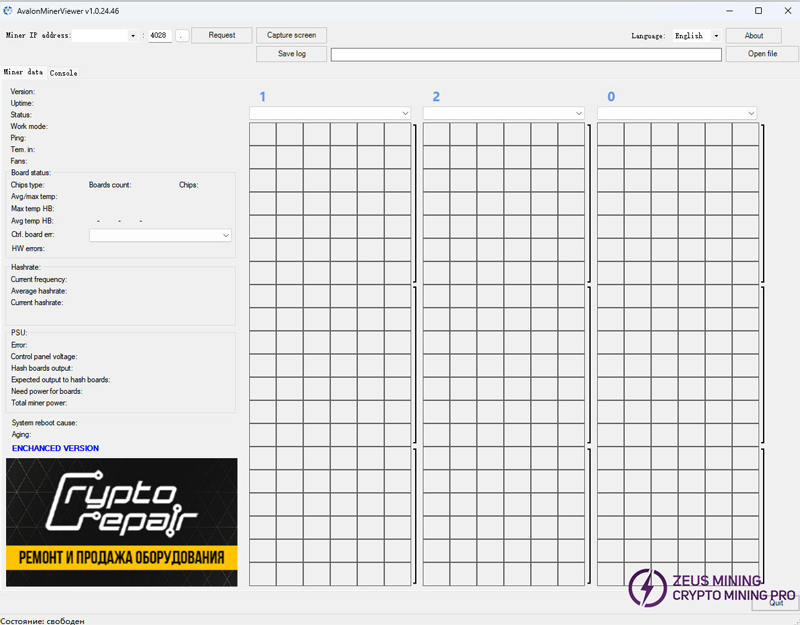
1. Main Interface Overview
The AvalonMinerViewer interface is mainly divided into a data display area and an operation control area. After connecting the mining rig, the main interface will display the following key information:
Data Item | Description |
Hashrate | Current hashrate and average hashrate |
Tem. in | Inlet air temperature |
Fans | Fan speeds |
Board status | Status of each hash board |
Chips type | Chip model |
Avg/max temp | Average and maximum chip temperatures |
HW errors | Hardware error count |
PSU | Power supply status |
Control panel voltage | Control board voltage |
Hash boards output | Hash board output power |
2. Temperature Monitoring: The "Sentinel" of Heat Management
High hashrate often comes with high heat generation. If temperature runs out of control, chips may throttle or even suffer physical damage. AvalonMinerViewer reads real-time data from temperature sensors integrated into the chips.
Key points to watch:
· Avg/max temp: Check the average and maximum temperatures of each hash board.
· Tem. in: Monitor the inlet ambient temperature to judge whether cooling conditions meet requirements.
· Chip temperature should ideally be kept within the optimal operating range of below 60°C. When temperatures approach critical levels, take prompt action: improve cooling, replace fans, or renew thermal paste.
In the miner's backend logs, parameters such as PVT_T0 and PVT_T1 can be used to view temperature lists for all chips on each hash board, helping locate chips with abnormal heating.
3. Domain Voltage Analysis: The "Barometer" of Energy Efficiency
Chip performance heavily depends on stable voltage supply. AvalonMinerViewer can monitor voltage fluctuations on hash boards.
Voltage fluctuation within ±5% is generally considered acceptable. If it exceeds this range, check the power supply or power delivery lines.
4. Hashrate Evaluation: A Multi-Dimensional "Benchmark" of Performance
Hashrate is the most direct indicator of a miner's output capability. AvalonMinerViewer displays hashrate data across multiple dimensions:
Hashrate Metric | Meaning |
Current hashrate | Instantaneous hashrate |
Average hashrate | Average hashrate |
GHSavg | 1 hour average hashrate (closest to the 24 hour average shown on the mining pool side) |
Key points to watch:
(1) Actual hashrate = Theoretical hashrate – DH (calculation error rate).
If HW errors keep rising, it indicates abnormal chip operation, you may need to reduce frequency or perform maintenance.
(2) Compare current hashrate with the rated hashrate to check whether the miner is running at full performance.
5. Other Important Features
(1) Error message alerts: When the miner encounters an anomaly, error messages are displayed on the interface.
(2) Kernel log viewing and saving: Supports viewing and saving the miner's kernel log, which helps with troubleshooting.
(3) Command control: Users can send control commands to the miner via the software.
1. Log Analysis and Fault Localization
When the miner experiences hashrate fluctuations or board dropouts, follow these steps:
(1) Check in AvalonMinerViewer whether the HW errors count has risen abnormally.
(2) Check the Board status to see if any hash board is offline.
(3) Save the kernel log and analyse chip-level error information.
(4) Combine temperature and voltage data to determine whether the issue stems from insufficient cooling, unstable power supply, or actual chip damage.
The Avalon miner's CGMiner API logs provide rich debug information to help locate faulty components (e.g., hash boards, PMU boards, MM boards, fans, etc.).
2. Integration with Other Tools
AvalonMinerViewer can be used alongside the following tools to build a complete miner management solution:
(1) Avalon Miner Upgrade Tool: For firmware upgrades, supporting all mass-production models such as A3202, A3201, A3200, etc.
(2) Avalon Buddy: It can scan IPs and perform fault detection based on logs.
(3) Avalon FMS: Canaan's official farm management system, suitable for large-scale mining farm centralised management.
Q1: What if the software cannot scan for miners?
(1) Confirm that the miner and the computer are on the same local network.
(2) Check whether the miner's API port is the default 4028.
(3) Verify that the miner's API function is enabled (you can configure the api_allow parameter via the miner's web interface).
Q2: What if the displayed data is garbled or incomplete?
(1) Try switching the language to English.
(2) Confirm that the miner's firmware version is compatible with the software.
Q3: Does the software support remote monitoring?
AvalonMinerViewer is primarily designed for local network monitoring. For remote monitoring, you can use it together with FMS or VPN solutions.
AvalonMinerViewer is a lightweight mining monitoring tool that presents the three core metrics-temperature, voltage, and hashrate-in an intuitive graphical interface. It is an indispensable assistant for Avalon miner operators. This tutorial will guide you quickly master this "hashboard general practitioner," ensuring your miner operates at its optimal state.
About authorJay Zha | ZEUS MINING Senior Hardware Engineer
Specializing in ASIC miner fault diagnosis and repair, with many years of experience repairing the entire Antminer series (S19, S21, L7, L9, etc.). Proficient in quickly locating faults in core modules such as fans, power supplies, temperature controllers, and ASIC chips through kernel logs, and dedicated to providing mining farm operators and maintenance technicians with systematic and operational troubleshooting guides.
🏷 Area of expertise: ASIC miner repair
📱 WhatsApp: +86 19123969124
 China Mainland Hong Kong
  Business Hours: (GMT+8) 08:30-20:00 Mon to Sat
  Company Phone: +86-023-72227777
