

The B8 B8Pro hashboard tester is an all-in-one maintenance tool designed specifically for ASIC repair technicians and mining farm maintenance personnel. It integrates functions for hashboard testing, EEPROM read/write/erase operations, power supply testing, temperature sensor testing, and fan speed testing. Compared to traditional test fixtures, it utilizes a Type-C power input for enhanced portability and supports power bank operation, facilitating on-site maintenance. It significantly reduces the time required to diagnose faults in hashboards, power supplies, and fans.
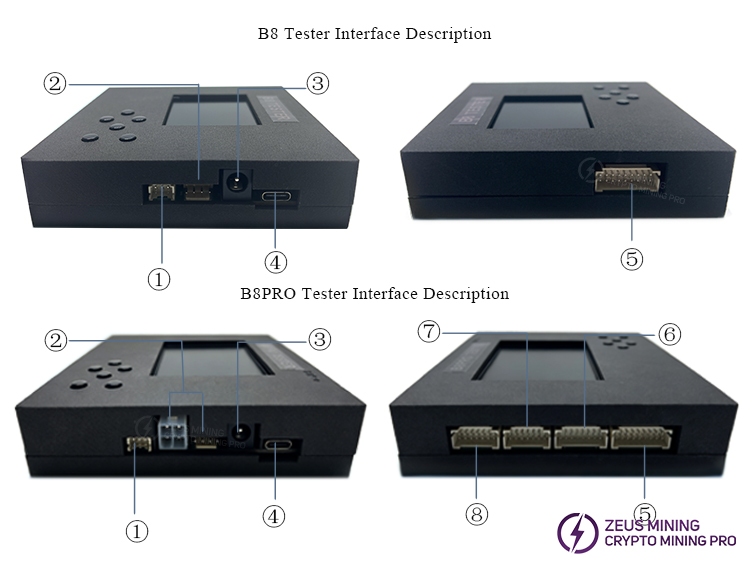
No. | Port | Function Description |
① | APW series PSU test port | Tests output voltage for Antminer APW series power supplies (including APW17, APW12, APW11, APW9 series, etc.) |
② | Fan test port | Tests fan speeds (4pin and square 4pin connectors) |
③ | 12V powering port | Provides power for fan testing |
④ | Type-C 5V powering port | Provides power for B8 / B8PRO test fixtures |
⑤ | Antminer full series,Whatsminer air cooling series hash board test port | Tests the full range of Antminer models and Whatsminer air-cooled hash boards, including Antminer 23, 21, 19, and 17 series; Z11, Z15, Z15PRO; L3/L5/L7/L9; D7/D9/K7/KS3/KS5/KS7; S9/11/15 series; and Whatsminer 20, 30, 50, and 60 series, etc. |
⑥ | Whatsminer Hydro cooling series hash board test port | Tests for faults in Whatsminer Hydro hash boards (including M63, M53, and M33 series, etc.) |
⑦ | Reserved Avalon hash board test port | Tests for faults in Avalon hash boards (currently under development) |
⑧ | Innosilicon hash board test port | Tests for faults in Innosilicon hash boards |
1. Power-on and main menu:
Connect the Type-C cable to a 5V power adapter or power bank, the tester will automatically start up and proceed directly to the main test menu, and no computer is required.
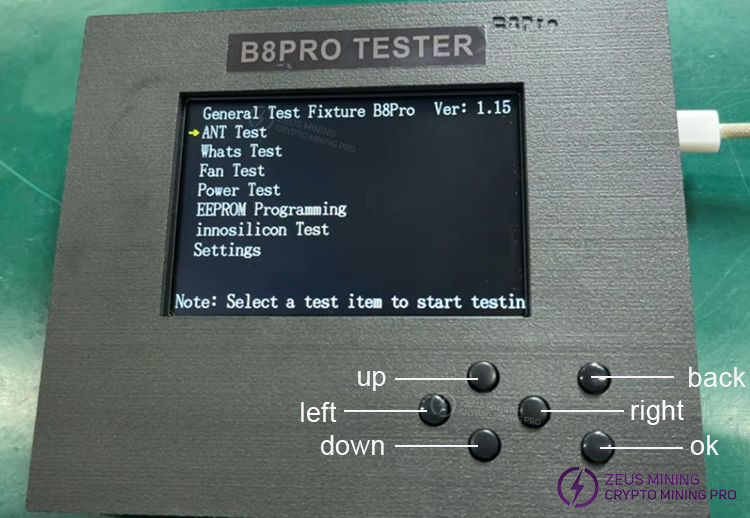
Upon entering the interface, you will see the testing functions supported by the fixture. Use the "up" and "down" buttons to select the desired function, then press the "ok" button to start the test.
2. Hash board testing procedure:
1) Antminer hash board testing
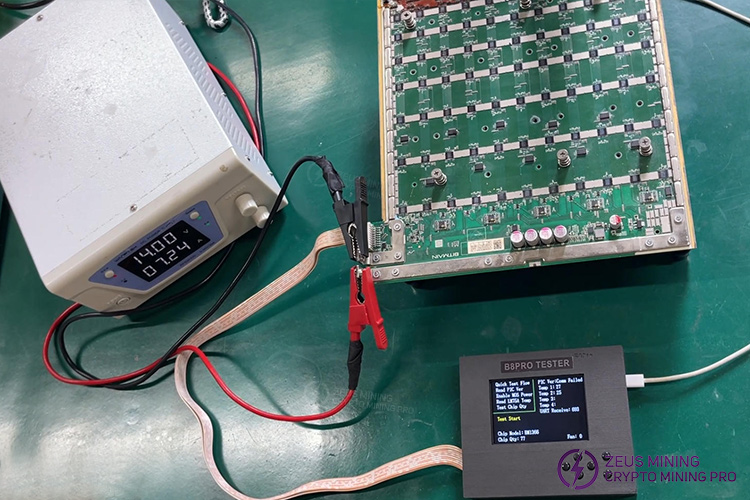
Taking the S19XP hash board as an example, connect the hash board and the B8pro fixture by following these steps:
① Connect the fixture to the S19XP hash board using the 18pin test cable;
② Turn on the KPS3030D adjustable power supply;
③ Connect the power supply to the hash board: attach the red alligator clip to the positive terminal and the black clip to the negative terminal;
④ Connect and activate the cooling base to provide cooling for the hash board during testing;
⑤ Press the "Output" button on the KPS3030D power supply to power the hash board;
The connection diagram is shown below:
After selecting "ANT Test" and choosing the corresponding machine model, press the "OK" button; you will see the test interface shown in the figure below:
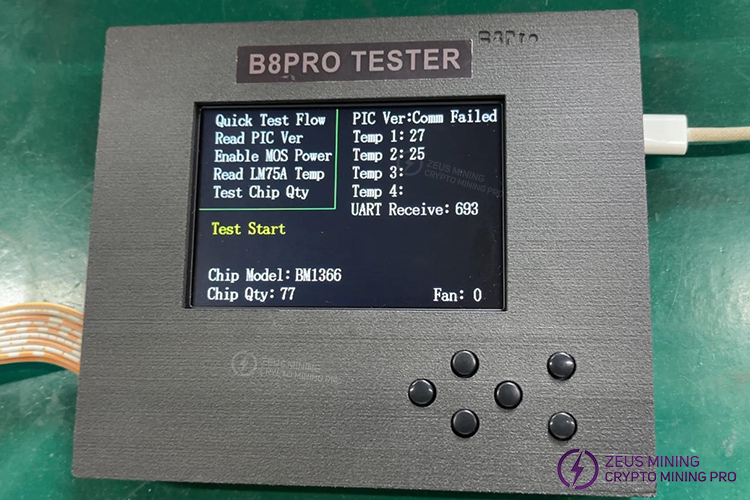
PIC Ver: Comm Failed – Indicates that the hash board lacks a PIC chip.
Temp 1: 27 – Indicates the temperature of temperature sensor chip 1.
Temp 2: 25 – Indicates the temperature of temperature sensor chip 2.
Chip Model: BM1366 – Indicates the ASIC chip model on the hash board.
Chip Qty: 77 – Indicates the total number of ASIC chips detected.
2) Whatsminer hash board testing
Taking the M50 hash board as an example, connect all cables:
① Use the Whatsminer data line data cable to connect the test fixture to the M50 hash board;
② Turn on the KPS3030D adjustable power supply;
③ Connect the power supply to the hash board: attach the red alligator clip to the positive terminal and the black clip to the negative terminal;
④ Connect and activate the cooling base to provide cooling during the test;
⑤ Press the "Output" button on the power supply to power the hash board;
The connection diagram is shown below:
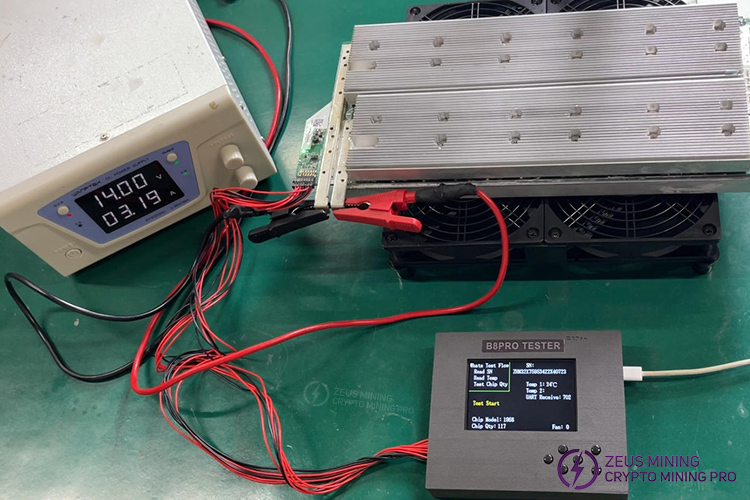
After selecting "Whats Test," select "Air Cooled Series Test" and press the "OK" button; you will see the test interface shown in the figure below:
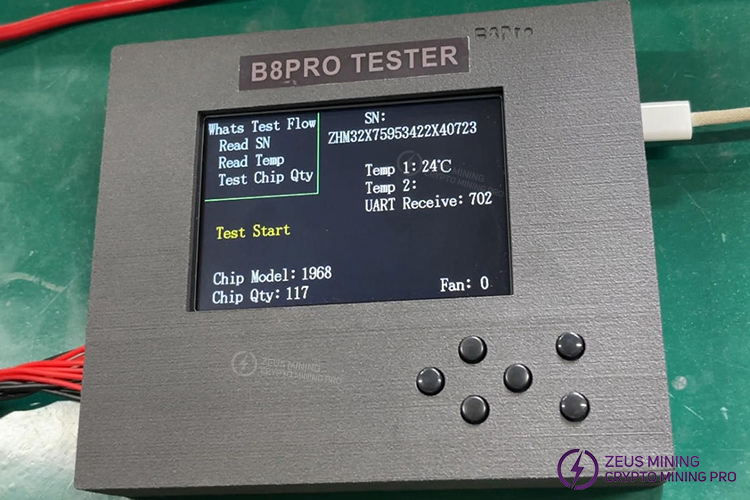
Temp 1: 24°C – Indicates the temperature of the thermal sensor chip.
Chip Model: KF1968 – Indicates the model of the ASIC chips on the hashboard.
Chip Qty: 117 – Indicates the total number of ASIC chips detected.
3. Reading and writing hashboard EEPROM files
Supports reading, writing, and saving EEPROM files for Whatsminer and Antminer hashboards. Common use cases include backing up the original EEPROM before repair and writing EEPROM data from a functional board to a faulty one to restore operation.
The methods for reading and writing EEPROM files are the same for both Antminer and Whatsminer; the Antminer S19XP hashboard is used here for demonstration.
Connect the test cable between the fixture and the hashboard; the connection diagram is shown below:
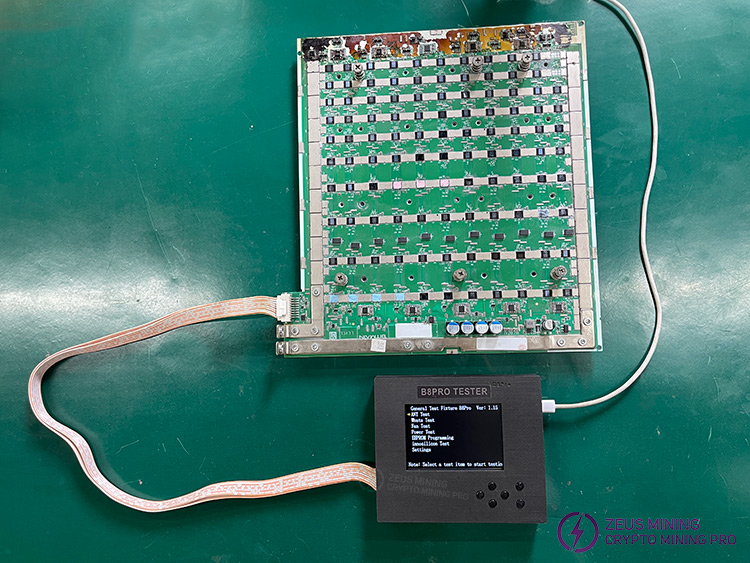
① Read EEPROM: After selecting "Read Data," save the original hash board's EEPROM data to List 1. Be sure to perform a backup before repairing the hash board.
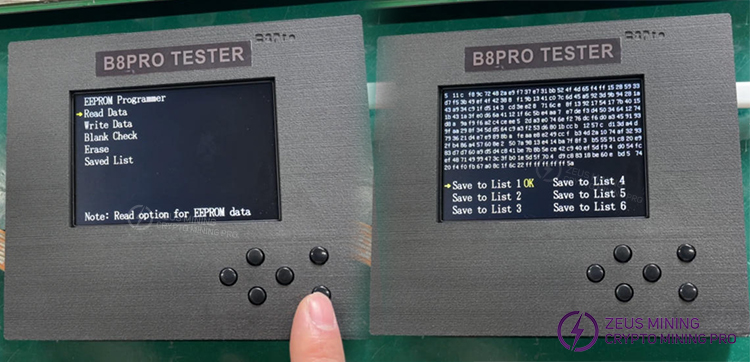
② Writing to EEPROM: After selecting "Write Data," select the previously saved "List 1" and wait for the "Write OK" message to appear, indicating that the write operation was successful.
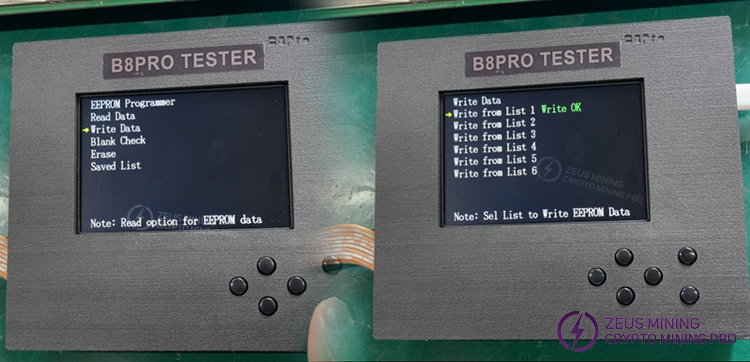
The tester features six non-volatile memory slots; EEPROM data can be saved to these slots for future use.
4. Short-circuiting CI/CO/TX/RXD signals to quickly locate a faulty chip
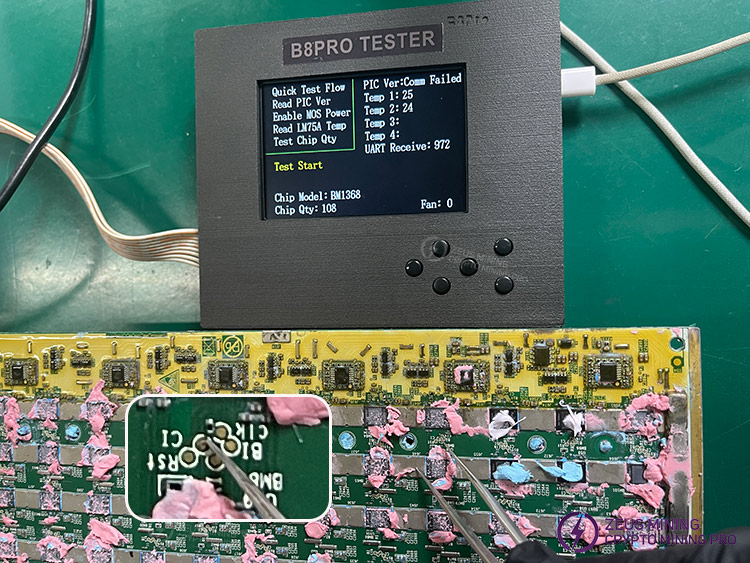
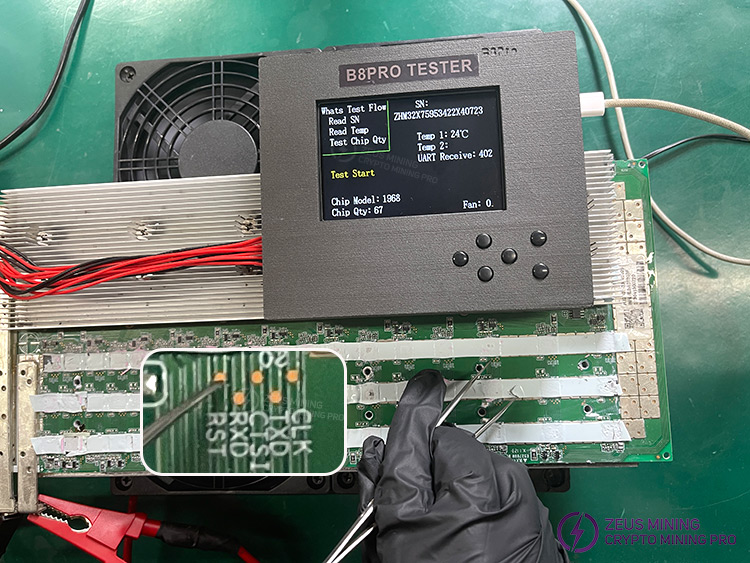
When a hash board fails to meet the required hash rate or an ASIC chip malfunctions, the faulty chip can be quickly identified by short-circuiting the ASIC chip's CI/CO/TX/RXD signals.
Procedure: Place one tip of a pair of tweezers on the CI/CO/TX/RXD signal test point of the ASIC chip and the other tip on the corresponding ASIC chip's negative terminal. If the number of the short-circuited ASIC chip matches the number displayed on the tester, the chip is functioning normally; if they do not match, the chip is faulty.
5. Antminer Power Supply Test
We use the APW12 power supply for this demonstration. Connect the test fixture to the power supply using a 4-pin voltage regulation cable; the connection diagram is shown below:
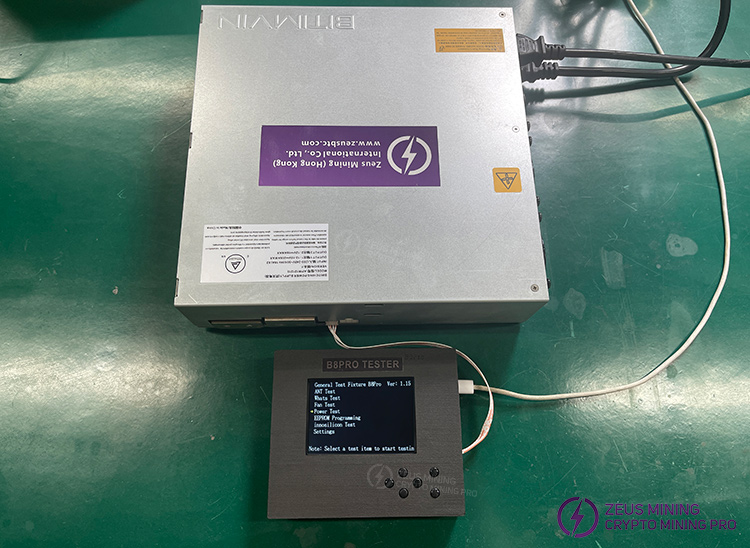
After selecting "Power Test" on the tester, choose the corresponding power supply model and output voltage, then click the "OK" button to view the following test interface:
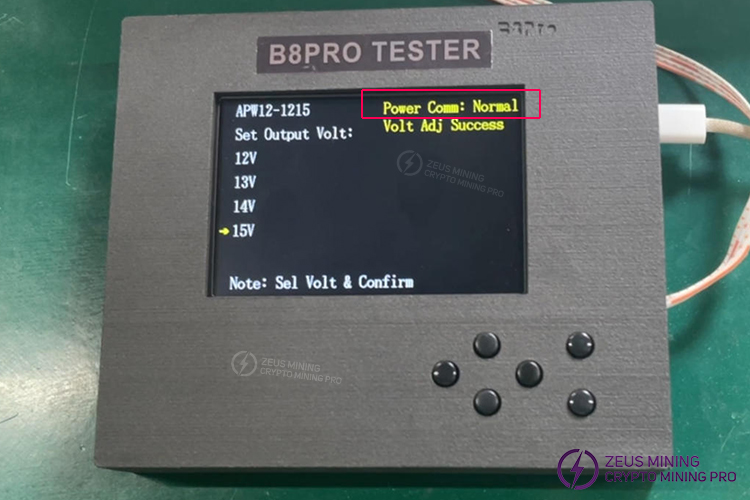
Power Comm: Normal – Indicates that the power supply voltage is normal.
6. Fan Status Assessment
The B8 B8 Pro test fixture assesses the condition of the fan by measuring its rotational speed. The connection diagram is shown below:
Note: The 12V power port must be connected to perform the fan test.
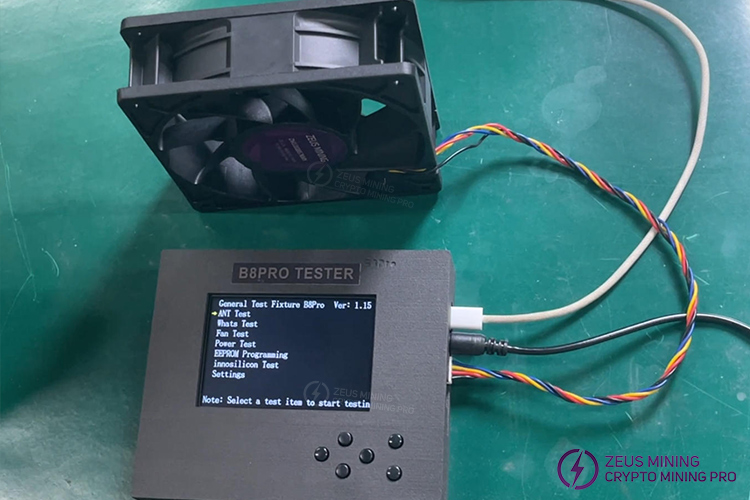
Select the "Fan Test" button on the test fixture to enter the test page, then press and hold the "Right" button to set the Fan Speed Value to 100, allowing the fan to run at full speed. A difference of approximately 10% between the real-time speed and the set speed indicates normal operation.
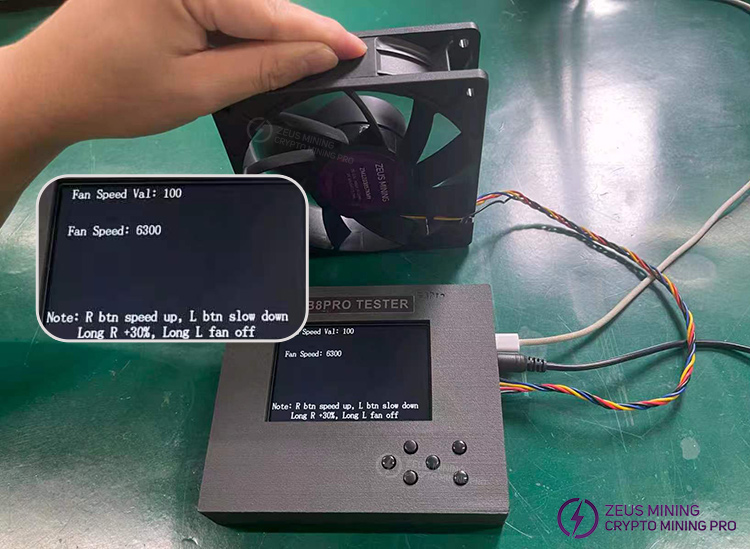
Fan Speed Val: 100 – Indicates the fan is running at full speed.
Fan Speed: 6300 – Indicates the fan speed is 6300 RPM.
1. The Type-C port supplies power only to the tester unit itself. The hash board must be powered by a separate, adjustable power supply.
2. Always disconnect the power before connecting or disconnecting signal and power cables; hot-plugging may damage the tester's I/O ports.
3. EEPROM cloning requires a backup file from the same hardware version; firmware mismatches can cause hash board malfunctions.
4. ASIC chips generate heat during hash board testing; using a cooling base is recommended.
 China Mainland Hong Kong
  Business Hours: (GMT+8) 08:30-20:00 Mon to Sat
  Company Phone: +86-023-72227777
